Shadow AI Is Now a Compliance Problem: How to Build an AI Governance Layer Before Your Next Audit
-
 Shankar Jayaraman
 - 07 Aug, 2026
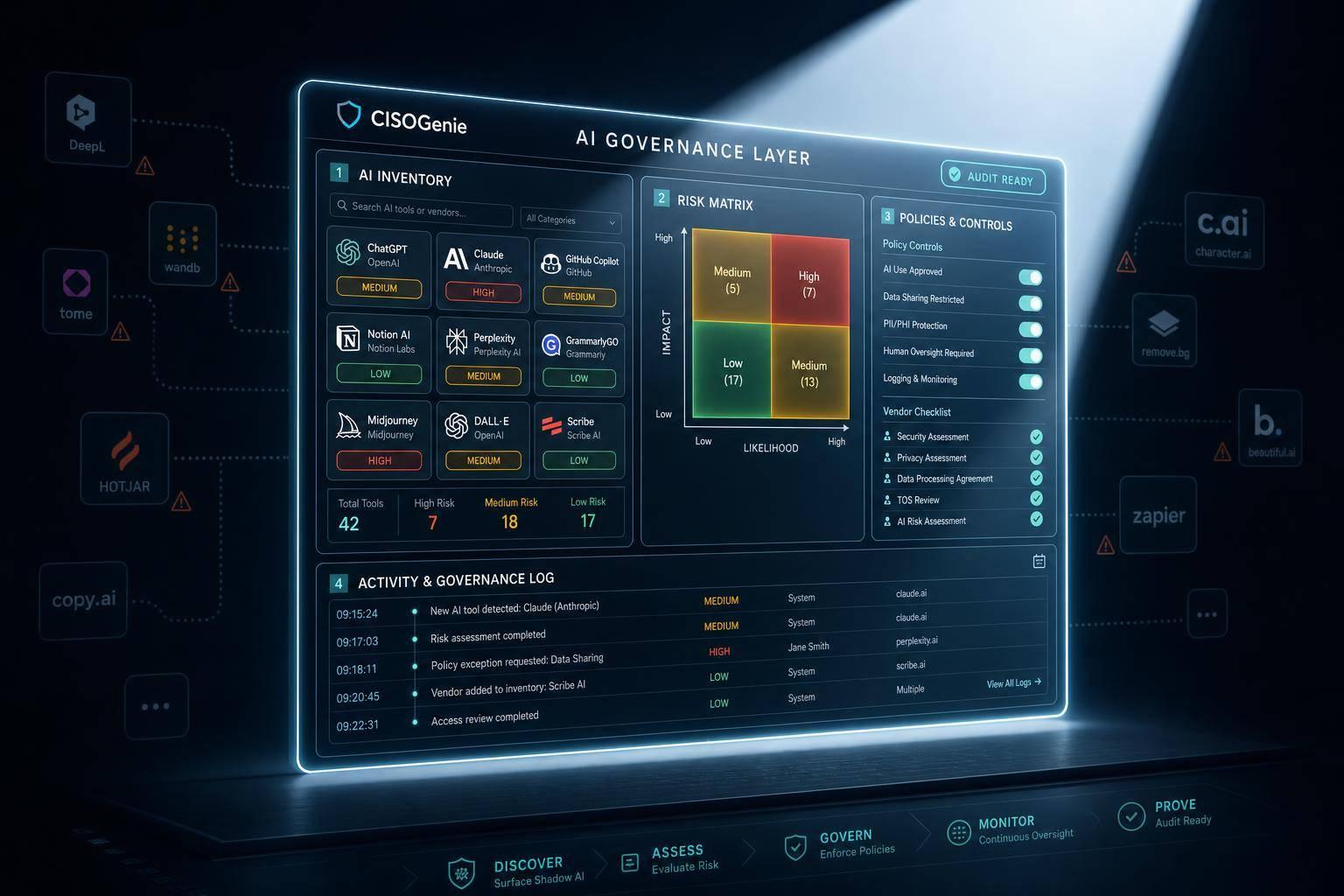
If I can’t show AI use in logs, approvals, and vendor records, an auditor may treat it as a control gap. That is the core issue. Shadow AI is no longer just about data security; it now affects ISO 27001, SOC 2, GDPR, the DPDP Act, RBI CSF, and SEBI reviews.
Here’s the short version:
- Employees are already using AI in browsers, SaaS add-ons, IDE tools, and agents.
- Approved software does not mean approved AI use.
- A single untracked use case can lead to gaps in:
- asset and supplier registers
- vendor review
- data handling records
- access control
- logging
- human oversight
- Manual surveys often miss 50% to 80% of actual AI use.
- I’d fix this with a simple 5-step control layer:
- list all AI tools in use
- sort them by risk
- set clear use rules
- run approval and vendor checks
- keep logs and audit evidence
A 30-day sprint is usually enough to get the basics in place before the next audit:
- Days 1–10: find AI use and stop high-risk cases
- Days 11–20: publish policy, start approvals, review vendors
- Days 21–30: build the audit pack with logs, approvals, and exceptions
What matters most is simple: every AI tool should be known, owned, checked, and logged. That is how I’d turn shadow AI from a surprise in audit week into a controlled risk on record.
This article explains how to do that in plain steps, with a clear compliance lens for Indian organisations.
How shadow AI creates findings across ISO 27001, SOC 2, GDPR, DPDP Act, RBI CSF, and SEBI
Where auditors typically find gaps
Auditors don’t look for assumptions. They look for evidence. And shadow AI usually leaves holes in that paper trail.
If a tool doesn’t appear in the asset register or supplier register, there’s no clear base for reviewing vendor risk, data classification, or access controls. In many cases, a SOC 2 Type II report is one of the first audit artefacts used to check processing and access controls. If that report isn’t available, vendor assurance becomes much harder to defend.
This gets messier when employees sign up for tools like Kimi K3 using a personal Google account or phone number instead of corporate SSO. Once that happens, central identity control and offboarding become hard to manage. And if there are no prompt logs or data logs, the organisation can’t show what was shared, who shared it, or where that data went.
One gap often doesn’t stay in one lane. The same missing control can set off findings across several frameworks at the same time.
Framework mapping table: AI governance requirements by control area
The table below maps common gaps in inventory, vendor review, access, and logging to the frameworks they affect. It also sets up the five-step governance build covered in the next section.
| Control Area | What Auditors Look For | Frameworks Affected |
|---|---|---|
| AI Inventory | Tool listed in asset and supplier register | ISO 27001 (A.8), SOC 2 (CC3.2) |
| Vendor Review | SOC 2 report, DPA, and security assessment on file | GDPR, DPDP Act, SEBI CSCRF |
| Acceptable Use | Policy covering what data employees may submit to AI tools | GDPR, DPDP Act, RBI CSF |
| Monitoring & Logging | Logs of AI interactions and data egress events | ISO 27001 (A.12), SOC 2 (CC7.2) |
| Evidence Retention | Approval workflows and policy acknowledgement records | SOC 2, RBI CSF, SEBI CSCRF |
For firms under RBI CSF and SEBI CSCRF, shadow AI can also appear as unapproved third-party processing. In plain English, that means company data is being handled by an external tool without formal risk review or oversight.
The example below shows how a single untracked use case can snowball into several audit failures.
A hypothetical audit scenario
A customer success team at a financial services firm pastes customer call notes into a public AI assistant to draft replies. No one asked for approval. The tool isn’t listed in the vendor register. There’s no DPA.
A review of that one behaviour can surface gaps across multiple frameworks:
- ISO 27001 / SOC 2: The tool is missing from the asset and supplier inventory. There’s no vendor security assessment. Monitoring logs show no record of the data transfer. That leads to findings in asset management, supplier relationships, and logging controls.
- GDPR / DPDP Act: Customer personal data was processed by an unreviewed sub-processor without a DPA. The organisation can’t show that the transfer was checked or that personal data was handled with due care. Under the DPDP Act, that is a direct data fiduciary obligation failure.
- RBI CSF / SEBI CSCRF: There’s no human-in-the-loop oversight for a high-risk use case involving sensitive financial data. The processing activity was never reviewed or approved through the required vendor governance process.
The problem isn’t bad intent. It’s the lack of evidence, the unreviewed vendor, the undocumented movement of data, and the missing approval trail. One shadow AI use case can trigger findings across four frameworks.
The next section turns this gap map into a control layer built around inventory, policy, approvals, vendor review, and monitoring.
5 steps to build an AI governance layer
Use the gap map above to turn shadow AI into controlled, documented use.
Steps 1 and 2: Build an AI usage inventory and classify risk
Start by pulling signals from SSO logs, procurement records, browser extensions, IDE plug-ins, and local CLI tools to surface unapproved AI use.
Then, for each tool, record:
- vendor assurance
- retention terms
- access method
- model type
Do one more thing here: note whether open-weight tools are self-hosted, because that changes third-party exposure.
Once you have that data, place each tool into a risk tier. Tools that handle personal data, financial records, or other sensitive corporate information should sit in a higher-risk category. General productivity use cases with no data sharing can sit in a lower tier.
Each tool should also be tagged by owner, business unit, data class, and framework impact. That way, the inventory connects straight to the control areas and rules picked out in the gap map above.
Tag each tool by owner, data class, and framework impact so policy and approvals can follow the same register.
Steps 3 and 4: Set policy, run approval workflows, and check vendors
Your AI acceptable-use policy should answer three plain questions:
- what data employees may enter into AI tools
- which tools are approved
- what needs prior approval
Be explicit about prohibited inputs. Customer PII, financial data, and sensitive corporate information are common examples. The policy should also require employees to acknowledge it, and those acknowledgements should be kept as audit evidence.
Next, pair that policy with a light approval workflow for any new AI tool request. The workflow should capture the business reason, the data types involved, and the risk tier before sign-off.
If a tool handles personal data or sensitive corporate information, run a vendor check. At a minimum, verify whether:
- a SOC 2 Type II report is available
- there is a data processing agreement on file
- sub-processors are disclosed
- data retention rules are defined
- the vendor has any publicly disclosed incidents
Use the same policy and vendor data to drive monitoring and evidence collection.
Step 5: Set up monitoring and evidence collection for continuous compliance
Collect SSO access logs, policy acknowledgements, training completions, vendor assessments, exception logs, and incident records tied to AI use.
Treat these outputs as continuous compliance support. In practice, that means they back up access review, vendor reassessment, exception tracking, and audit evidence retention across frameworks like ISO 27001, SOC 2, GDPR, and the DPDP Act.
An AI-native GRC platform like CISOGenie can centralise inventories, vendor risk workflows, evidence, and monitoring so audit files stay current. These records become the audit pack for your next review.
A 30-day action plan before your next audit
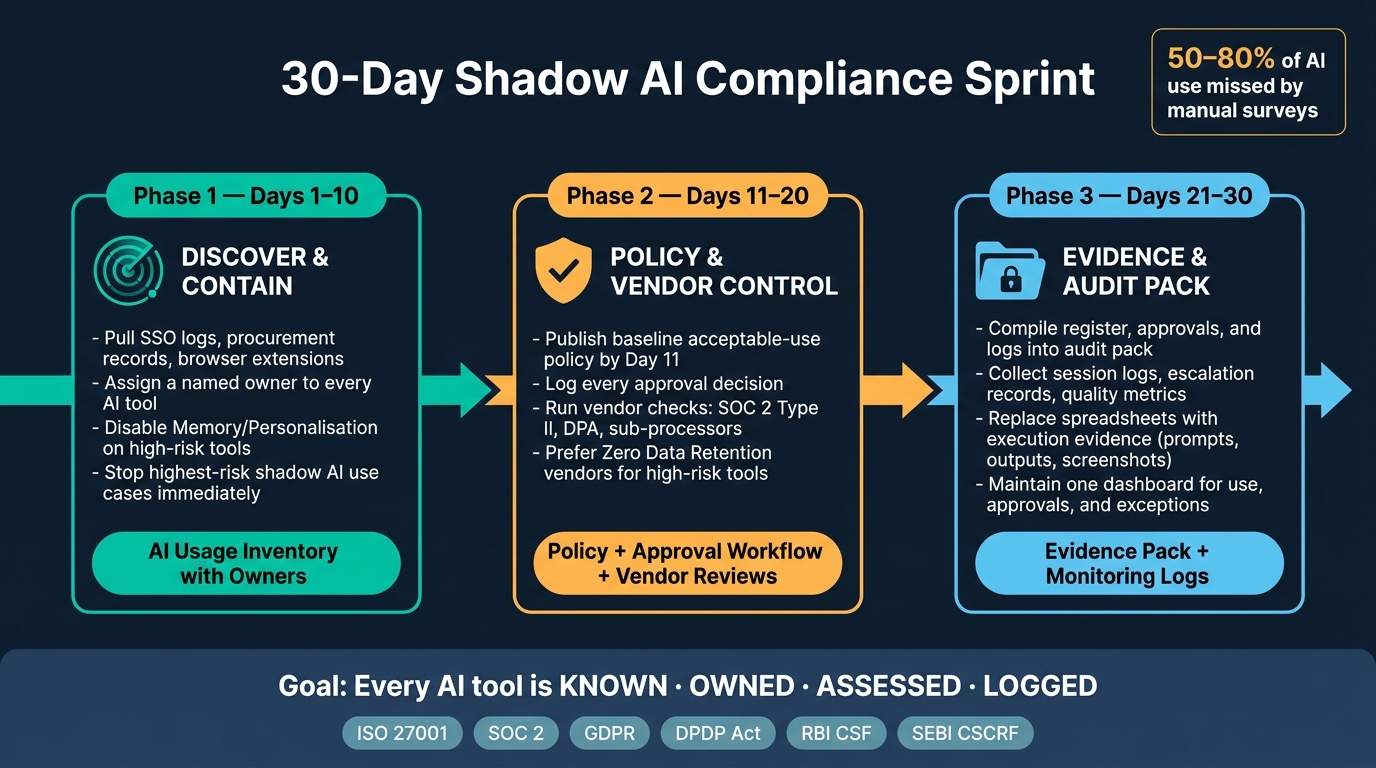
30-Day Shadow AI Compliance Sprint: Audit-Ready in 3 Phases
Use the inventory, policy, approval, vendor, and logging controls above as the base for a 30-day remediation sprint. The goal is simple: map AI use, fix the biggest gaps first, and put together audit evidence for shadow AI, not just tidy up things internally.
Days 1 to 10: Find current AI use and stop the highest-risk cases
Start with discovery before you write a single policy. Use local AST-based code scanning tools to map internal codebases, documentation, and configurations, and surface unapproved AI use before auditors do. This can expose hidden AI API calls or embedded AI features.
Give every tool a named owner. Then focus first on tools that handle sensitive data, especially where Memory or Personalisation is turned on. Turning those features off cuts the risk of sensitive context being kept across sessions.
Once you know which tools carry the most risk, move straight into policy and approval control.
Days 11 to 20: Formalise policy, approvals, and vendor reviews
Publish a baseline acceptable-use policy by Day 11 and log every approval decision. Set up a simple approval workflow for new AI tool requests and keep the approval records that come out of it.
For higher-risk tools, lean towards vendors that offer Zero Data Retention and a current SOC 2 Type II report. That matters even more when GDPR, the DPDP Act, or RBI CSF apply.
After the policy and vendor checks are in place, switch to evidence capture and residual-risk reporting.
Days 21 to 30: Collect audit evidence and report residual risk
By Day 21, turn the register, approvals, and logs into an audit pack. If AI is being used in production, collect session logs, escalation records, and quality metrics.
Also, move away from manual spreadsheets. Use execution evidence instead: saved prompts, outputs, screenshots, and logs from AI agents. That gives auditors a clear audit trail of AI behaviour. Keep one dashboard for current use, approvals, and open exceptions.
These three phases should produce one thing auditors can review: control evidence.
| Phase | Primary Output | What It Covers for Auditors |
|---|---|---|
| Days 1–10 | AI usage inventory with owners | Discovery and ownership |
| Days 11–20 | Acceptable-use policy, approval workflow, vendor review | Policy and third-party controls |
| Days 21–30 | Evidence pack and monitoring logs | Audit trail and continuous oversight |
Keep the evidence pack current: inventory, policy, approvals, vendor review, and logs, all packaged for ISO 27001, SOC 2, GDPR, DPDP Act, RBI CSF, and SEBI. That way, the audit starts from documented control, not discovery.
Conclusion: Put AI use under governance before it appears in your audit
This guide isn’t about slowing AI adoption. It’s about making sure every tool already in use is known, owned, assessed, and logged before an auditor asks you to show the records.
Recent disclosures make the issue plain: unauthorised employee AI use can trigger compliance and disclosure duties, not just security risk. That puts AI governance squarely in the audit lane, not in the “we’ll deal with it later” pile.
The next steps are straightforward. First, find where AI is being used. Then set policy, offer approved options, and keep the evidence up to date. Visibility comes first. Manual surveys usually miss 50% to 80% of actual AI usage because so much of it happens in browser tabs or inside new AI features baked into approved SaaS tools.
The 30-day sprint is the link between initial clean-up and day-to-day governance. CISOGenie brings inventory, risk assessments, policy management, vendor checks, monitoring, and audit evidence into one place, so teams can stop scrambling through spreadsheets when audit season arrives. Once those controls sit in one system, compliance stops feeling like a last-minute fire drill.
Every AI tool should be known, owned, assessed, and logged. That steady governance layer is what turns shadow AI from an audit problem into a controlled, documented risk.
FAQs
How do we detect shadow AI quickly?
Move past manual surveys and take a layered approach across:
- network and proxy logs
- identity and access signals
- endpoint and browser monitoring
It also helps to check procurement and expense data for paid subscriptions, then use browser-based discovery to spot personal accounts. For compliance readiness, keep a live inventory of tools and classify each one by data sensitivity so you have an audit-ready evidence trail.
Which AI uses need formal approval first?
Any AI tool, model, or agent that handles company data should go through formal approval first. That matters even more when the data includes customer PII, financial records, proprietary source code, or internal HR data.
Start with tools that don’t have a signed DPA in place, especially when that agreement doesn’t clearly state that your data won’t be used for training. This often includes consumer-tier tools, browser extensions, and built-in AI features that slip into day-to-day workflows.
A simple tiered model usually does the job:
- Approved: Safe for use with defined guardrails
- Conditional: Allowed only in limited cases or with added checks
- Prohibited: Not allowed for company data
What evidence should we keep for audit?
Keep an audit-ready evidence trail that shows how your AI use has changed over time, not just a set of policy documents sitting in a folder.
That means keeping both current and past AI inventories, your risk assessment method, approved AI vendors linked to DPAs, training records, and incident logs for unauthorised use.
The point is simple: an auditor doesn’t just want to see what your rules say today. They want to see proof that your team has been tracking AI use, checking risk, approving tools properly, and dealing with problems when they come up.
You should also keep records of:
- agent decisions
- access certifications
- policy enforcement actions
These logs help show that AI governance is not a one-time paperwork exercise. It’s active, checked, and working in day-to-day practice.